- info@inthings.tech
- Room No. 16/591 Karinkallathani, Chethalloor-PO, Thachanattukara-II Palakkad.


About Inthings
Inthings, founded in May 2019, is a dynamic and innovative technology company driven by a team of visionary entrepreneurs and highly skilled software engineers.
Customers & Affiliations
Blog
Blog
31/01/2026

Site Surveillance Framework: IP Camera Integration via GStreamer and Ant Media Server
Category: Computer Vision
Introduction
We're super excited to share some awesome news about the Onesense platform! We've been working on something really cool—a brand new section that's going to make site monitoring easier and better for our clients.
It is very important to keep an eye on what's happening at your sites right? Well, we're on a mission to make that super simple and super effective and starting by creating a special part of Onesense just for site monitoring. This blog inquire into how to build a test version (we call it a proof of concept) to stream images to the server. It's like laying the groundwork for something really amazing!
Problem Statement
The Site monitoring project emerged from a practical challenge: managing devices remotely across customer sites. These devices are crucial for collecting data, but their dispersed locations pose a surveillance problem.
One of the main issues we face is not just monitoring the devices' performance but also keeping track of unexpected entries to the sites. These can range from unauthorized personnel to wildlife disturbances, all of which could potentially disrupt operations or compromise safety. It's tough to ensure these sites remain secure and operational without constant supervision. That's why we need a smart solution that can bridge this gap and provide real-time insights into both device performance and site security.
So, our goal with the site monitoring project is to create a comprehensive system that allows us to remotely monitor customer sites, ensuring not only the proper functioning of devices but also the security of the premises. By tackling these challenges, we aim to improve our service quality, enhance site safety, and build stronger relationships with our clients.
Research and Implementation
To develop a comprehensive site monitoring solution, we've identified two critical components: the platform for client access and the means of transmitting the stream. Through meticulous research and evaluation, we've honed in on the perfect solutions for both.
1. Ant Media Server
Firstly, we'll explore Ant Media Server—a powerful and scalable platform for client access. With its suite of features including adaptive bitrate streaming and cross-platform compatibility, Ant Media Server provides the perfect foundation for clients to view live streams and access archived footage with ease.
2. GStreamer Pipeline
Next up is the GStreamer pipeline—a versatile tool for capturing and transmitting video streams with efficiency and flexibility. Leveraging GStreamer's robust functionality, we'll seamlessly relay data from devices at remote sites to our platform, ensuring real-time monitoring capabilities.
By combining the capabilities of Ant Media Server and the GStreamer pipeline, we're poised to create a seamless and efficient streaming platform for our site monitoring project. With these essential components in place, we're ready to forge ahead with development and deployment, bringing our vision to life.
1. Ant Media Integration
When it comes to providing clients with access to live streams and archived footage, the choice of media server is crucial. After thorough research and evaluation, we've selected Ant Media Server as the cornerstone of our streaming platform.
Ant Media Server is a robust and scalable media server solution designed specifically for live streaming and video-on-demand applications. Its feature-rich capabilities make it an ideal choice for our project's requirements.
Features:
- Support for a wide range of streaming protocols including RTMP and HLS: This versatility ensures compatibility with various client devices and platforms, allowing for seamless access to live streams and archived content.
- Offers adaptive bitrate streaming: Ant Media Server dynamically adjusts the video quality based on the viewer's network conditions. This ensures a smooth and uninterrupted viewing experience, even in challenging network environments.
- Scalability: Whether we're dealing with a handful of clients or thousands of concurrent viewers, Ant Media Server can easily scale to meet the demand, ensuring consistent performance and reliability.
By integrating Ant Media Server into our streaming platform, we're confident that we can provide clients with a robust and user-friendly solution for accessing and interacting with live streams and archived footage. With its comprehensive feature set and scalability, Ant Media Server lays a solid foundation for our site monitoring project.
Implementation
Ant Media Server offers two versions for users: the Community Edition and the Enterprise Edition. To determine which version best suits your needs, you can refer to the comparison table provided in the Ant Media Server documentation.
For installation guidance, we recommend following the AntMedia Quickstart Documentation. This comprehensive guide provides step-by-step instructions to facilitate a smooth installation process.
Note: After completing the installation, if you're utilizing the Community Edition or lack a custom domain, accessing the web interface requires using port 5080. In such cases, the web URL is http://localhost:5080/.
Once logged into the web interface, users can create and view streams directly through the dashboard, providing an immediate interface for site surveillance.
Create a New Screen
To create a new stream you can either use the default web application or create a new one.
In tap menu select the web application > New Live Stream > Live Stream
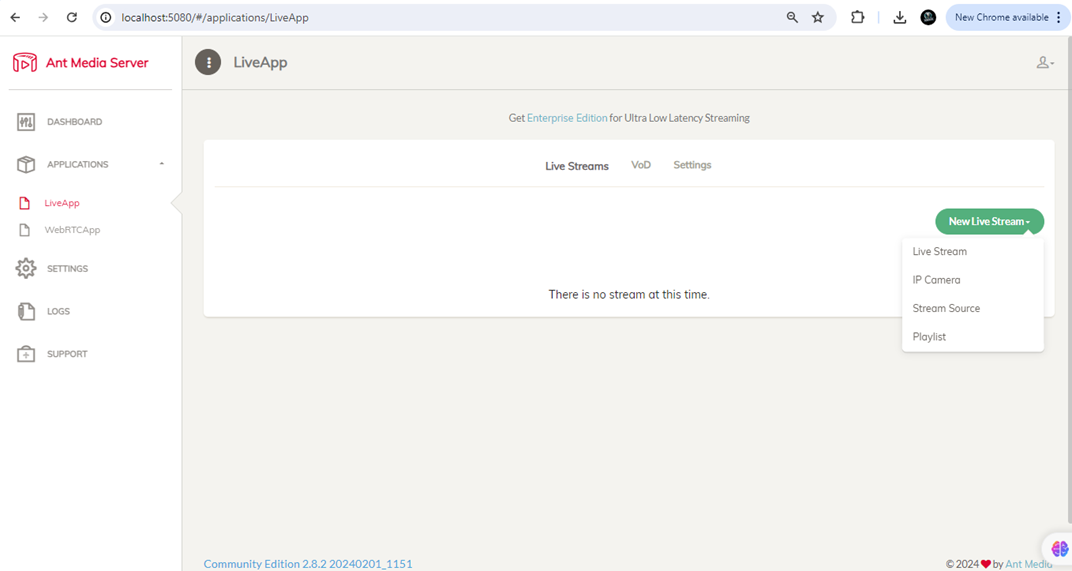
Enter the Stream information like:
- Name: Name for the stream (e.g., Site_01_Main_Gate)
- Stream Id: Unique Id of the stream. If you do not enter a value, it will be generated automatically
Once you created the stream you will get a publish RTMP Url where you can publish the stream.
2. GStreamer Integration
When it comes to transmitting video streams efficiently in our site monitoring project, we've turned to the GStreamer pipeline as our solution. GStreamer provides a versatile and flexible framework for capturing and transmitting video streams seamlessly.
Features:
- Pipeline Construction: To construct pipelines that handle various aspects of media processing, including encoding, decoding, Muxing and streaming. This enables us to capture video streams from devices deployed at remote sites and transmit them to our platform in real-time.
- Extensive Plugin Ecosystem: Robust functionality and flexibility to tailor the streaming process to our specific requirements. This ensures reliable and high-quality streaming capabilities, empowering us to monitor customer sites effectively.
In our implementation process, we followed best practices and utilized the resources available within the GStreamer community to ensure a smooth integration. As a result, we're confident in the reliability and efficiency of our streaming solution powered by GStreamer.
Exploring the Gstreamer Pipeline
Our GStreamer pipeline is the backbone of our streaming setup, orchestrating the flow of audio and video data to deliver a seamless streaming experience. Let's take a closer look at how it works.
1. Audio Component:
- We kick things off with audiotestsrc, a handy tool for generating test audio data.
- Next, we convert the audio format using audioconvert to ensure compatibility.
- Then, we encode the audio using voaacenc to compress it efficiently.
- The encoded audio data is parsed by aacparse to prepare it for streaming.
2. Video Component:
- Meanwhile, on the video side, we have imagesequencesrc fetching images of our hardworking crew from the specified location.
- Decodebin handles the decoding of the image data, ensuring compatibility with our pipeline.
- Timeoverlay adds a timestamp overlay to our video stream, providing additional context.
- Then convert the video format using videoconvert for optimal streaming performance.
- x264enc encodes the video data using the H.264 codec, a popular choice for streaming.
3. Combining Audio and Video:
With both audio and video components ready, we merge them together using the mux element. This combines the audio and video streams into a single stream, ready for delivery.
4. Packaging for Delivery:
Next, we package our combined stream using flvmux. This prepares the stream for delivery in the FLV (Flash Video) format, suitable for streaming over RTMP (Real-Time Messaging Protocol).
5. Streaming to Destination:
Finally, we send our packaged stream to its destination using rtmpsink. This element handles the streaming process, ensuring our content is delivered to the specified RTMP server location.
Pipeline Workflow
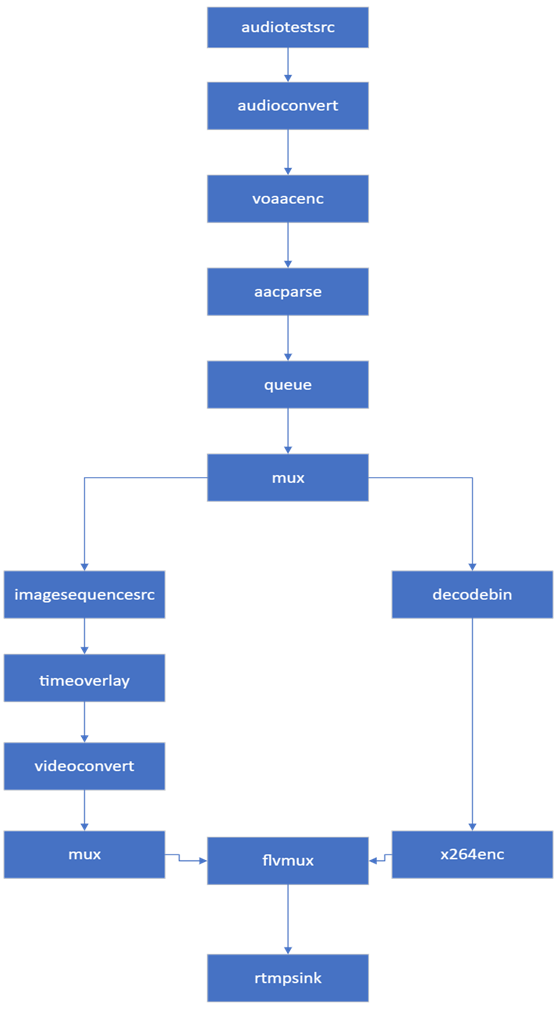
Our team has specially designed a custom board Pipeline Workflow chart. Below are the key elements that constitute the technical architecture of our streaming system:
- Audiotestsrc: This element generates test audio data.
- Audioconvert: Converts audio data from one format to another. It's often used to ensure compatibility between different audio formats in the pipeline.
- Voaacenc: Encodes audio data to AAC format. AAC (Advanced Audio Coding) is a widely used audio encoding format.
- Aacparse: Parses AAC audio streams. It's used to handle AAC-encoded audio data within the pipeline.
- Queue: Provides buffering capabilities, helping to smooth out the data flow in the pipeline. It ensures a continuous flow of data between elements.
- Mux: Multiplexes audio and video streams into a single container format. In this case, it combines audio and video data into a single stream.
- Imagesequencesrc: This element reads a sequence of images and converts them into video frames.
- Decodebin: Automatically detects and decodes various audio and video formats. It's a flexible element that can handle a wide range of media formats.
- Timeoverlay: Adds a time overlay on the video frames. It's often used to display timestamps on the video.
- Videoconvert: Converts video data from one format to another. Similar to audioconvert, it ensures compatibility between different video formats in the pipeline.
- x264enc: Encodes video data using the x264 codec, which is commonly used for H.264 video compression.
- flvmux: Multiplexes audio and video streams into the FLV (Flash Video) container format. FLV is commonly used for streaming video over the internet, particularly in conjunction with the RTMP protocol.
- rtmpsink: Sends the audio and video stream to an RTMP (Real-Time Messaging Protocol) server. RTMP is commonly used for live streaming over the internet.